How to Achieve a Perfect 100/100 Core Web Vitals Score on Next.js Frameworks
In modern web development, user experience and search engine visibility are deeply intertwined. Google’s Core Web Vitals (CWV) are no longer just arbitrary performance benchmarks they are foundational search ranking criteria.
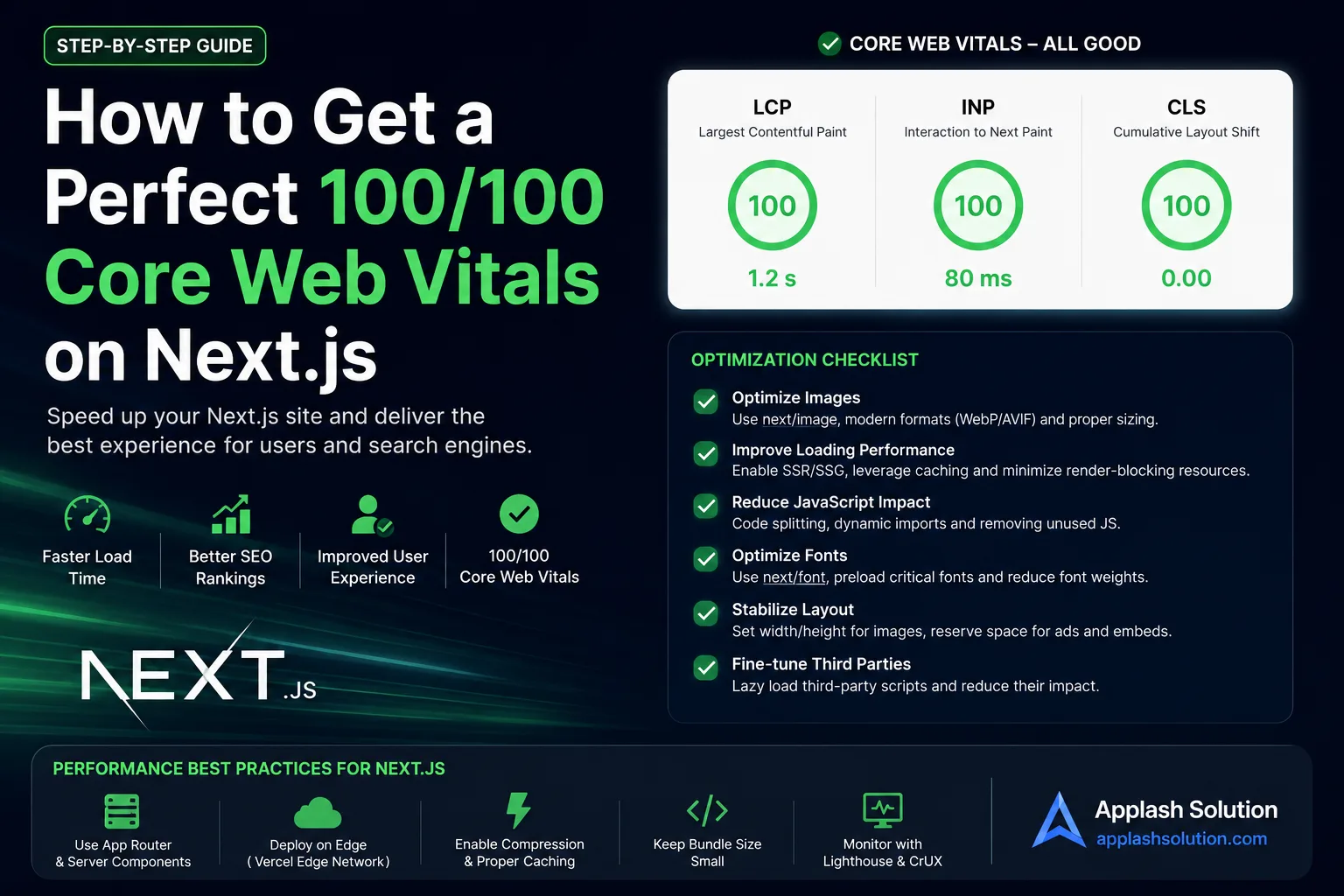
While the Next.js framework provides an excellent operational baseline out of the box, hitting a flawless 100/100 Mobile and Desktop Lighthouse score requires deliberate, advanced optimizations. Let's break down how to systematically eliminate latency from your application.
1. Master the Core Metrics
To fix performance issues, you must know exactly what you are measuring:
Largest Contentful Paint (LCP): Measures loading performance. To pass Google's thresholds, your main hero visual or text block must render within 2.5 seconds of the page starting to load.
Interaction to Next Paint (INP): Measures responsiveness. It assesses how quickly a user gets a visual confirmation after clicking, tapping, or typing on a page. To score well, response lag must remain under 200 milliseconds.
Cumulative Layout Shift (CLS): Measures visual stability. Elements jumping around while loading frustrates users and impacts rankings. Your target score is a strict 0.1 or lower.
2. Advanced Next.js Optimization Playbook
Step 1: Crush LCP with Next/Image and Priority Loading
The most common cause of a poor LCP score is an unoptimized hero image or a delayed background banner asset.
Never Use Standard HTML Image Tags: Always leverage
next/image. It serves responsive, modern WebP or AVIF formats based on client browser capability.Explicitly Define Priority: For the primary image visible immediately above the fold, bypass lazy loading entirely by appending the
priorityattribute. This tells Next.js to pre-load the image file using high-priority browser requests:
import Image from 'next/image';

export default function HeroBanner() {
  return (
    <div className="relative w-full h-[500px]">
      <Image
        src="/assets/hero-banner.webp"
        alt="Production Optimized Dashboard Overview"
        fill
        priority
        sizes="(max-width: 768px) 100vw, 50vw"
        className="object-cover"
      />
    </div>
  );
}
Step 2: Eliminate Layout Shifting (CLS = 0)
Layout shifts happen when the browser does not know how much screen real estate an image, ad, or dynamic component requires before it loads.
Fix Content Dimensions: Always supply explicit
widthandheightdimensions to image elements, or use absolute layout containers paired with relative bounds.Reserve Dynamic Space: If your Next.js application injects dynamic client data or third-party ads, use a wrapper
divwith a fixed minimum height (min-h-[250px]) or CSS aspect-ratio configurations. This reserves a dedicated layout block on the screen, preventing standard content from jumping downward when the asynchronous data resolves.
Step 3: Optimize Interactivity (INP) via Code-Splitting
High Main-Thread Blocking Time (TBT) destroys your INP score. If a browser is busy compiling massive chunks of JavaScript, it cannot process user clicks.
Lazy Load Non-Critical Interactivity: Do not load bulky components like modals, heavy data grids, or multi-step checkout forms on initial page load. Use
next/dynamicto pull them down only when requested:
import dynamic from 'next/dynamic';

// This component will only be downloaded when rendered
const HeavyAnalyticsChart = dynamic(() => import('@/components/AnalyticsChart'), {
  loading: () => <p className="animate-pulse">Loading Chart Analytics...</p>,
  ssr: false // Disable server-side rendering for client-only canvas engines
});
📈 Monitoring and Sustaining Your 100/100 Core Web Vitals Score
Achieving perfection once is easy; maintaining it as your code scales requires robust guardrails.
Implement automated Lighthouse CI checks directly within your GitHub pull request workflows. Reject deployments that lower performance metrics.
Utilize Vercel Speed Insights or Real User Monitoring (RUM) platforms. Synthetic lab testing (like PageSpeed Insights) simulates a clean setup, but tracking real-world user metrics across varying networks provides the true measure of your app's health.
Work with Applash
Have a process you want to automate?
Tell us how your business works today. A senior person reads every message and replies within one business day.